Automatic download from SEF
Incoming e-invoices are pulled from the Electronic Invoice System as they arrive, ready for approval.
Every incoming e-invoice from the Electronic Invoice System (SEF) lands in Rogo automatically, goes through your approval flow and is synced back to SEF — without changing your existing procedures and ways of working.
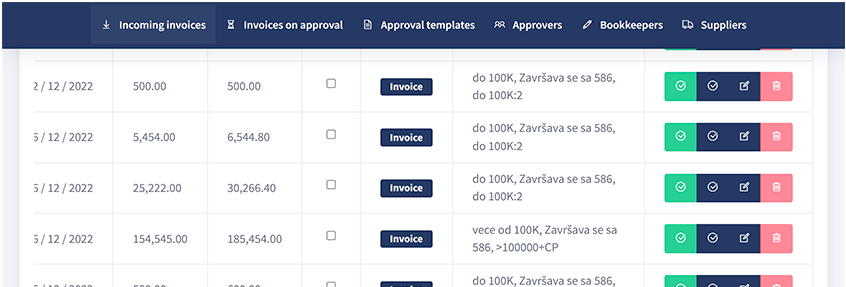
Why Rogo
In large companies, approving invoices for payment often involves multiple colleagues, and the route depends on the supplier, the amount, the type of service and more. In SEF you can only mark an invoice as approved or rejected — you cannot create an approval route. Rogo adds that missing layer, so the finance department finishes the job with much less stress and time spent.
How Rogo works
Every e-invoice that arrives at SEF is loaded into Rogo automatically — no manual export or re-entry.
If the invoice fits an existing template — supplier VAT number, service, amount — Rogo suggests how to approve it.
No template? Define who approves and how — serial or parallel. Track progress and remind anyone who hasn't approved yet.
Accepted invoices go to payment in your existing software. Rejections are updated in SEF automatically, informing the supplier.
Main functionalities
Get ready for electronic invoicing without replacing the tools and procedures you already rely on.
Incoming e-invoices are pulled from the Electronic Invoice System as they arrive, ready for approval.
Acceptance or rejection of each incoming e-invoice is written back to SEF, so the supplier is informed automatically.
Define who takes part in approving each invoice and in what order — serial or parallel — and see how far it has come.
Rogo recognises when a template applies — by supplier, amount or service — and picks the right route for you.
Your invoices and approval history are stored securely, in software built under ITEMS' ISO/IEC 27001 certified processes.
Once approved, the e-invoice is forwarded to your accounting program, where you proceed exactly as before.
Pricing
Choose the plan that matches your invoice volume, contact us and start using Rogo.
€24.99 / month
with 12-month contract3
€29.99 / month without contract
€59.99 / month
with 12-month contract3
€69.99 / month without contract
€99.99 / month
with 12-month contract3
€109.99 / month without contract
€129.99 / month
with 12-month contract3
€149.99 / month without contract
1 Maximum number of incoming invoices during one year · 2 Maximum number of users with the invoice approver role · 3 Price available with a contract for a minimum of 12 months
Video instructions
Short walkthroughs from the Rogo YouTube channel.
Clients who trusted us




Questions
All companies are now obliged to use the e-invoice system, so existing programs that aren't compatible with it can no longer function in the new setup. Rogo was created to be fully compatible with the standard that electronic invoices bring.
In SEF you can mark an invoice as approved or not approved, but you cannot create an approval route. You can in Rogo. After you approve or reject an e-invoice, its status is automatically updated in SEF, which informs the supplier.
Rogo is designed to have no significant impact on your existing procedures. Since e-invoices are on SEF, Rogo downloads them automatically. Once an e-invoice is approved, it is forwarded to your accounting program, where you proceed as before.
Yes. You can create approval schemes that depend on the supplier, the amount and more. The system recognises which template applies to each incoming e-invoice, which greatly simplifies choosing the right route — and reminders keep every approval moving.
Call +381 63 264 715 or write to office@items.rs